ดาวโหลดฟรี Adobe Acrobat Pro 8.0

Adobe Acrobat Pro 8.0 เป็นโปรแกรมที่เคยมีราคาขายครับ แต่นานมาแล้วตั้งแต่ปี 2006 ที่ผ่านมา จัดว่าเป็นตัวเต็มของค่ายที่มีความสามารถมากกว่าตัว Reader ที่ใช้งานแค่เปิดดูหรือพิมพ์เอกสารได้อย่างเดียว ดังนั้นตัวโปร ก็จะมาพร้อมความสามารถเพิ่มเติมมากกว่าที่ตัวปกติทำไม่ได้ เช่น การแก้ไข edit การรวมหรือการรวมไฟล์ PDF เข้าเป็นไฟล์ด้วยกัน การเข้ารหัสป้องกันเอกสาร การยกเลิกการเข้ารหัส การแทรกข้อความ ภาพประกอบ การบันทุกเอกสารใหม่ และการใส่ดิจิตอล Signature หรือลายเซ้นต์ดิจิตอลลงบนเอกสารนั้นเอง


เนื่องจากโปรแกรมออกมานานแล้ว ตอนนี้ผู้พัฒนา เปิดให้ดาวโหลดและใช้งานฟรีโดยไม่ต้อง Crack ให้ผิดกฎหมาย นับว่าเป็นเรื่องน่าสนใจอย่างยิ่ง ไม่ควรช้าครับ สำหรับท่านที่เคยใช้โปรแกรมดูไฟล์ PDF ที่เปิดอ่านได้อย่างเดียวหรือทำอย่างอื่นได้นิดหน่อย ต้องลองตัว Pro ตัวนี้เลยครับ รับรองว่าไม่ผิดหวังแน่นอนกับความสามารถที่จะได้เพิ่มมากขึ้น


แม้ว่าจะบอกว่ารองรับแค่ XP ,2000 แต่ลองกับ Windows7 แล้ว ก็ลงได้และใช้งานได้ครับ โดยจะต้อง คลิกขวาของไฟล์ที่โหลดมาและ ไปที่ Properties > Compatibility, checked "Run this program in compatibility mode" และติ้กเลือก "Windows XP (Service Pack 2)".

กรณีที่ถูกถามให้ใส่หมายเลข S/N นับเบอร์ ให้กรอก serial number 1118-1414-1955-8737-8172-0350 . คลิก Next > จากนั้นก็ทำตามคำแนะนำในการติดตั้งไปจนจบขั้นตอน

Windows Serial number: 1118-1414-1955-8737-8172-0350 
Mac Serial number: 1118-0416-1130-3724-2927-7040

คุณสมบัติย่อโปรแกรม

Platforms: Windows 2000, Windows XP
Version: 8.0.0
Licence: Freeware
Manufacturer: Adobe
Date Added: {ts '2013-01-10 14:58:00'}

ขนาดไฟล์ดาวโหลด 478 MB ค่อนข้างจะใหญ่ แต่อินเตอร์เน็ตความเร็วสูงสามารถโหลดได้ครับ 
ดาวโหลด  Adobe Acrobat Pro 8.0 
เพิ่มลิงค์สำรองจาก Google Drive ให้สำหรับท่านที่ใช้วินโดว์ 7 หรือ 8 หรือ 10 ก็ต้องลองดู
โหลด Adobe Acrobat Pro8 

หน้าตานำเข้าสู่การใช้งานของโปรแกรม สามารถคลิกเลือกตามความต้องการได้เลยครับ ไม่ว่าจะเป็นการสร้างไฟล์ PDF การรักษาความปลอดภัย หรือการลงนามดิจิตอล เป็นต้น 


Adobe Acrobat Pro 8.0 used to be sell software from Adobe since 2006 ,it is the full version that come along with tools and features more that reader only version which is use to open and print the PDF file only. The pro version can do the following; Edit ,joint and combine document ,Add text and description ,save as ,insert digital signature and etc.

Because this software was released since 2006 so it quite a long time ago and then the company is freely open to download and use by the user around the world so the interest computer users who interest in PDF management software can download and install on your PC with the full ability to use.

Although the platform prefers XP/2000 ,however on Windows7 could be install with a bit tricky by Properties > Compatibility, checked "Run this program in compatibility mode"

and if you want to put the serial number 1118-1414-1955-8737-8172-0350 . click Next and follow the installation process until complete.

ดาวโหลด Windows 8 Transformation Pack 9.0

Windows 8 Transformation Pack 9.0 เป็นฟรีแวร์ดาวโหลดสำหรับผู้ใช้งานคอมพิวเตอร์ Windows 7 (32 bit), Windows 7 (64 bit), Windows Server, Windows Vista (32 bit), Windows Vista (64 bit), Windows XP ที่ต้องการจำลองหรือแปลงหน้าตาการใช้งานของโปรแกรมให้เป็น Interface แบบวินโดว์ 8
ความน่าสนใจของโปรแกรม และการแปลง ก็พัฒนาออกมาสำหรับคนที่สนใจหรือไม่แน่ใจว่าจะชอบหน้าตาหรือคำสั่งในการใช้งานแบบ windows 8 หรือเปล่า เรียกว่าอาจจะยังไม่พร้อมหรือยังสับสนอยู่ว่า จะเปลี่ยนไปใช้งาน windows 8 ดีหรือไม่ ก็อาจจะโหลดเจ้า Pack นี้มาลอง install และทดลองดูก่อนได้ ว่าจะมีจุดเด่นที่หน้าตา และการเรียกใช้งานคำสั่งโปรแกรมต่างๆ ได้อย่างไร
การติดตั้ง
ถือว่าไม่ยากมากครับ แค่แตกไฟล์ที่ดาวโหลดมาแล้ว และทำตามคำแนะนำการติดตั้งจนแล้วเสร็จ จากนั้นอาจจะคอยสักพักเพื่อให้ระบบปรับจูนเข้าด้วยกัน และ reboot ใหม่เข้าสู่ UI ของ Windows8 แล้วครับ กรณีที่เราลองใช้งานแล้วอาจจะไม่ถนัดหรือไม่ประทับใจก็สามารถ uninstall ออกไปโดยที่ไม่มีผลกระทบต่อระบบ OS เดิมของเราได้
คุณสมบัติย่อ
Platforms: Windows 7 (32 bit), Windows 7 (64 bit), Windows Server, Windows Vista (32 bit), Windows Vista (64 bit), Windows XP
Version: 1.0
Licence: Freeware
Manufacturer: WindowsX
Date Added: {ts '2014-07-14 16:24:00'}
ขนาดไฟล์ 85M
ดาวโหลด Windows 8 Transformation Pack v9.0

ลูกเล่นที่น่าสนใจ 
Windows 8 Transformation Pack v9.0 additions and new features:

- Changed applying permissions program to cacls instead of icacls
- Changed default Immersive UI to Charms Bar for performance-wise
- Changed system files update detection to warning level that allow installation
- Fixed UxStyle loading improving compatibility
- Updated RocketDock’s Charms Bar start logo
- Removed system files permission applying for smoother installation
- Replaced Newgen Store with Desktop widget

ดาวโหลดฟรี Adobe Photoshop CS2 Free

ดาวโหลดฟรีสุดยอดโปรแกรมแต่งภาพถ่ายจากค่าย Adobe ที่ใจดีปล่อยให้ Users หรือผู้คนทั่วโลกได้ดาวโหลดและใช้งานโปรแกรมแบบว่าแจกฟรี ซึ่งรับรองและการันตีความสามารถของโปรแกรม โดยผู้ใช้งานจำนวนมากทั่วโลก ทีเดียว ยิ่งคนที่เคยสัมผัสหรือใช้งานโปรแกรมแต่งภาพของค่าย Photoshop มาก่อน ยิ่งไม่ต้องบอกหรืออธิบายอะไรกันมากให้เสียเวลาทีเดียว
ส่วนเหตุผลที่ทำไมถึงมาแจกฟรีก็ไม่ต้องไปรู้ของเขาหรอก แต่รับรองว่าเป็นของฟรีและดีจริง ยืนยันนอนยัน เพราะว่าเคยใช้งานมาก่อน sure sure สนใจก็สามารถเข้าไปดาวโหลดหรือดูเหตุผลที่เว็บไซต์ของ adobe.com ได้ครับ แต่จะต้องมี ID ในการ Log in เข้าไปดาวโหลดนะครับ ลงทะเบียนฟรีครับ หรือใครขี้เกียจลงทะเบียน ก็สามารถที่จะโหลดได้โดยตรง จากลิงค์ที่กำหนดไว้ด้านล่างละครับ
Looking for the best of the best photo editor for free then I would recommend this Adobe Photoshop CS2 Free with the following S/N Windows Serial number: 1045-1412-5685-1654-6343-1431
Mac OS X Serial number: 1045-0410-5403-3188-5429-0639
As you may known already previously this was for sell program ,but now the company kindly give out for free to download and use.
ข้อมูลย่อ
January 10, 2013
Freeware
Windows/Mac
340 MB
การติดตั้ง ต้องใช้หมายเลข S/N ตามที่ระบุด้านล่างนี้ละครับ

Windows Serial number: 1045-1412-5685-1654-6343-1431
Mac OS X Serial number: 1045-0410-5403-3188-5429-0639

The Power to Create the Extraordinary
Adobe Bridge— The next-generation File Browser for Photoshop CS2.
Vanishing Point— Groundbreaking ability to clone, paint and transform in the perspective of your images.
Image Warp— Warp any object, with customizable presets and adjustable control points.
Noise Reduction— Advanced correction of noise created in high-ISO shooting, plus JPEG artifact reduction.
32-bit HDR— Create and edit 32-bit, High Dynamic Range images, for the widest range and richest detail.
Spot Healing Brush— Fast, efficient one-click retouching of dust, scratches and other image flaws.
One-Click Red Eye Correction— Instantly eradicate this common photo flaw.
Optical Lens Correction— Correct common lens issues like barrel and pincushion distortion.
Animation— Easily create animated Web graphics directly in Photoshop CS2.
Smart Sharpen— Intelligently counteract common photo blurring with advanced control.
Shadow/Highlight— Simple discrete adjustment of shadows and highlights, now also for CMYK images.
Enhanced 16-bit Editing— Additional filters, such as Liquify, are now available for use in 16-bit images.

Creation Acceleration
Smart Objects— Non-destructive editing and transformations, including Illustrator CS2 integration.
Multiple Layer Control with Smart Guides— Faster, more intuitive editing without using the Layers palette.
Multi-Image Camera Raw— Process multiple raw images while you continue to work in Photoshop CS2.
Video Preview— Send an instant preview of video-destined images to an external monitor.
WYSIWYG Font menus— Preview typefaces visually, right in the Font menu.
Printing Enhancements— New options enable more efficient, consistent print output.
All-New PDF Engine— Comprehensive, customizable presets and PDF 1.6/Acrobat 7.0 compatibility.
Enhanced Memory Use— Devote more than 2 GB of RAM to Photoshop CS2 for optimum performance.
Powerful Design Process Management— Easier versioning & collaboration with the new Adobe Version Cue®.
Integrated Adobe Online Services— Access and download professional Adobe Stock Photos and share and print online with Adobe Photoshop Services.

ดาวโหลด Adobe Photoshop CS2 Free
จะไปที่เพจของ Adobe และแนะนำว่าต้อง Sign in ด้วย email ของเราก่อน ถึงจะเข้าถึง โปรแกรม ในการดาวโหลดได้
Update เมื่อ 19 มี.ค.62

Adaptability — Making Photoshop CS2 Your Own
Menu Customization— Workflow-based presets and custom-defined menu sets, with color-keyed commands.
Enhanced Automation— New actions and scripts facilitating batch image processing and film & video production.
Variables— Streamline creation of repetitive graphics using imported spreadsheet data.
Event-Based Scripting— Expand your efficiency with commands triggered at specific points in your workflow

ดาวโหลดฟรี Microsoft Office Starter 2010


"Microsoft Office Starter 2010 ทำให้ผู้ใช้ที่บ้านซึ่งซื้อคอมพิวเตอร์ที่ได้โหลดซอฟต์แวร์ไว้ล่วงหน้าแล้ว สามารถใช้งานพื้นฐานทั่วๆ ไปได้ในทันที Office Starter จะมีเฉพาะ Microsoft Word Starter 2010 และ Microsoft Excel Starter 2010 ซึ่งเป็นรุ่นที่ลดฟังก์ชันการทำงานของ Microsoft Word และ Excel และจะมีโฆษณารวมอยู่ด้วย Office Starter จะอยู่ในรูปแบบของซอฟต์แวร์ที่โหลดไว้ล่วงหน้าในคอมพิวเตอร์รุ่นใหม่บางรุ่นเท่านั้น โดยจะมีตัวเลือกให้สามารถปรับรุ่นเป็นชุดโปรแกรม Office รุ่นสมบูรณ์ได้ตลอดเวลา


Office Starter ไม่ใช่ซอฟต์แวร์รุ่นทดลองใช้ คุณจึงสามารถใช้งานได้นานเท่าที่คุณต้องการ เมื่อคุณพร้อมที่จะเปลี่ยนไปเป็น Microsoft PowerPoint 2010, Microsoft Outlook 2010 และฟังก์ชันการทำงานแบบเต็มรูปแบบใน Office รุ่นสมบูรณ์ "


โดยปกติแล้ว ไม่ว่าจะเป็นโปรแกรม OS หรือโปรแกรม Office ของ Microsoft ผู้ใช้งานหรือ Users จะต้องจ่ายเงินซื้อ Licence หรือ CD คีย์ ของโปรแกรมเท่านั้น จึงจะสามารถใช้งานของเขาได้ ไม่นับรวมแผ่น Copy นะครับ หรือไม่ก็เป็นลักษณะให้ทดลองใช้งาน Trial เท่านั้น


สำหรับคนที่ไม่มี Office ติดตั้งใช้งานกับเครื่องของคุณ หรือไม่ต้องการใช้งานของ Copy ตลอดจนนิยมชมชอบอะไรที่เป็น MS Office ดังนั้น แม้ว่าจะจำกัดความสามารถหรือว่า Function การใช้งานออกไปบ้าง รวมทั้งมีโฆษณาปนมาบ้าง แต่ก็จัดว่าเป็นของฟรี และไม่ Copyก็ถือว่าน่าสนใจและน่าใช้งานไม่น้อยครับ ดาวโหลด Microsoft Office Starter 2010
ข้อมูลย่อโปรแกรม
Platforms: Windows 7 (32 bit), Windows 7 (64 bit), Windows Vista (32 bit), Windows Vista (64 bit)
Version: 14.0.6109.5003
Licence: Freeware
Manufacturer: Microsoft
Date Added: {ts '2013-02-19 14:39:00'}

ดาวโหลด Thaiprathom

ThaiPrathom For Primary School  student เป็นแอพที่พัฒนาออกมาสำหรับชาวไทย และชาวต่างชาติ รวมทั้งคนที่สนใจเรียนภาษาไทย ที่ต้องการแอพช่วยในการเรียนภาษา เริ่มจากเบสิกๆ หรือพื้นฐาน ได้แก่การแนะนำ สระ วรรณยุกต์ การผสมคำ และการออกเสียงอ่าน
แอพทำออกมาได้ง่ายและน่าสนใจ พร้อมคำพูด Audio ที่ง่ายต่อการฝึกพูดตาม หรือฉุกเฉินก็เอาให้คนขับรถแท็กซี่ หรือคนไทยที่ผ่านไปมา ช่วยฟังและให้ความช่วยเหลือได้
หรือว่าจะเอาไว้เป็นแอพประจำตัว ดาวโหลดและติดตั้งใช้งานบนมือถือ android ,iPhone หรือ แท็บเล็ต ก็สะดวกและง่ายต่อการพกพาไปทุกที่
ภาพรวมของแอพ
แอพพลิเคชั่นภาษาไทยประถมเหมาะสำหรับน้องๆ ตั้งแต่ชั้นอนุบาลจนถึงชั้นประถมศึกษา ที่ต้องการเรียนรู้ในวิชาภาษาไทย ซึ่งจะประกอบไปด้วยเรื่องสระ วรรณยุกต์และมาตราตัวสะกด โดยจะมีทั้งเนื้อหาของแต่ละเรื่อง และมีตัวอย่างของคำแยกให้เห็นอย่างชัดเจน อีกทั้งยังมีเสียงเพื่อให้น้องๆ ได้ฝึกพูดตามอีกด้วย โดยใช้สีสันและภาพเป็นส่วนประกอบในแอพพลิเคชั่น เพื่อดึงดูดความสนใจให้น้องๆ สนใจมากขึ้นและเพลิดเพลินไปกับแอพพลิเคชั่นนี้ รวมทั้งยังมีแบบทดสอบเพื่อให้น้องๆได้ทดสอบความรู้ที่ตนเองมีอยู่ และพัฒนาตนเองให้มีความเข้าใจในพื้นฐานของวิชาภาษาไทยมากขึ้น

Download  Thai Language For Primary School 

ThaiPrathom - is an android app which was designed to help the learners to learn Thai language from the beginner level of kindergarten school up to the Primaries school. The contents of this app consist of Thai Alphabet ,Vowels and Word combining and phonetic.
This apps come along with image and sample to draw intention from the learner and to enjoy the learner ,moreover there is a test part to check the progression of the learner.
if you you a forefinger who looking for Thai app to learn Thai language ,then this app is your choice. 

  ภาษาไทยประถม - screenshot thumbnail

การดูว่าคอมพิวเตอร์มีบลูธูทหรือไม่

บลูทูธ การรับส่งข้อมูลไร้สายบนคอมพิวเตอร์หรือโทรศัพท์มือถือ เพื่อช่วยให้การสื่อสารข้อมูลของอุปกรณ์ง่ายขึ้น เร็วขึ้น และสะดวกขึ้น เช่น การรับส่งไฟล์ข้อมูลหรือไฟล์ภาพ การสนทนาแบบไร้สาย Hand free การฟังเพลง หรือการคุยผ่านบลูทูธ เป็นต้น 
บางคนอาจจะไม่ค่อยได้ใช้งานบลูทูธมากเท่าที่ควร เพราะว่าจะใช้แบตฯมาก ทำให้แบตหมดเร็วขึ้น สำหรับการเปิดการใช้งานหรือ Turn On ในคอมพิวเตอร์ Laptop ของ Asus นั้น สามารถทำได้ถ้าเครื่องของคุณมีการติดตั้งอุปกรณ์บลูธูท ในเครื่องเท่านั้น โดยผู้ต้องการเปิดการใช้งานให้เข้าไปที่แผงควบคุมการทำงาน Control Panel และ ทำตามขั้นตอนต่อไปนี้ 
 การเปิดหรือ Turn On บลูธูท 
  1. คลิก Start และ เข้าไปที่ Control Panel  
  2. เลือก Hardware and sound and Bluetooth Devices ถ้าคอมของคุณไม่มีอุปกรณ์บลูธูทติดตั้งอยู่ก็จะไม่มีรายการ Bluetooth แสดงขึ้นมาครับ 
  3. ถ้ามีให้คลิก Bluetooth Settings
  4. คลิก “Allow Bluetooth devices to find this computer”  เพื่อเปิดการใช้งานและอนุญาตให้อุปกรณ์ตัวอื่นๆ มองเห็นบลูธูทได้ 
  5. คลิก  Apply เพื่อให้ผลการตั้งค่ามีผลทันที 
  6. คลิก Ok เพื่อปิดหน้าต่างการทำงาน
How to Know If Your Laptop Has Bluetooth thumbnail

การเปิดใช้งานบลูธูทในวินโดว์ 8

บลูทูธ การรับส่งข้อมูลไร้สายบนคอมพิวเตอร์หรือโทรศัพท์มือถือ เพื่อช่วยให้การสื่อสารข้อมูลของอุปกรณ์ง่ายขึ้น เร็วขึ้น และสะดวกขึ้น เช่น การรับส่งไฟล์ข้อมูลหรือไฟล์ภาพ การสนทนาแบบไร้สาย Hand free การฟังเพลง หรือการคุยผ่านบลูทูธ เป็นต้น 
บางคนอาจจะไม่ค่อยได้ใช้งานบลูทูธมากเท่าที่ควร เพราะว่าจะใช้แบตฯมาก ทำให้แบตหมดเร็วขึ้น สำหรับการปิดการใช้งานหรือ Turn Off ในวินโดว์ 7 จะต้องเข้าไปที่แผงควบคุม Control Panel จากนั้น Device Manager และมองหาลิสต์รายการ บลูทูธ เพื่อ Off หรือ Disable 
การจัดการ Bluetooth ในวินโดว์ 8 จะสะดวกและง่ายต่อการจัดการมากกว่า 
 การเปิดหรือ Turn On บลูธูท 
  1. เลื่อนเม้าส์ไปยังบริเวณล่างขวาของจอ เพื่อให้ icons ของโปรแกรมการทำงานต่างๆ จะแสดงหรือปรากฏขึ้นมา 
  2. จากนั้นเลื่อนเม้าส์ขึ้นไปทิศทางด้านบน เพื่อแสดงหรือเปิดเผย icons ออกมา ซึ่งกลุ่มของ icons ที่แสดงออกมานี้ จะเรียกกันว่า Charm Bar
  3. คลิก Settings
  4. คลิก Change PC Settings
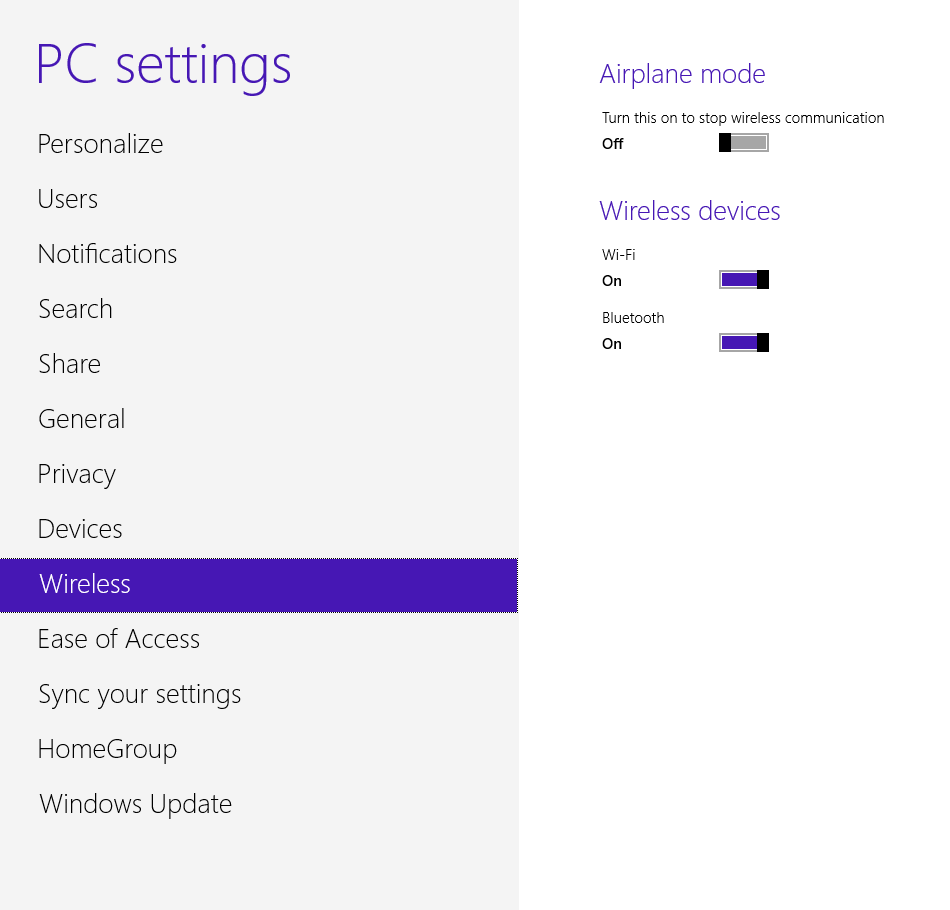
  5. คลิก  Wireless
  6. ภายใต้รายชื่อ Wireless Devices, turn Bluetooth on or off

Turn On and Off Bluetooth in Windows 8
Turn Bluetooth on and off from this screen.

การจัดการการเชื่อมต่อของ บลูธูท 

  1. เลื่อนเม้าส์ไปยังบริเวณล่างขวาของจอ เพื่อให้ icons ของโปรแกรมการทำงานต่างๆ จะแสดงหรือปรากฏขึ้นมา 
  2. จากนั้นเลื่อนเม้าส์ขึ้นไปทิศทางด้านบน เพื่อแสดงหรือเปิดเผย icons ออกมา ซึ่งกลุ่มของ icons ที่แสดงออกมานี้ จะเรียกกันว่า Charm Bar
  3. คลิก Settings
  4. คลิก Change PC Settings
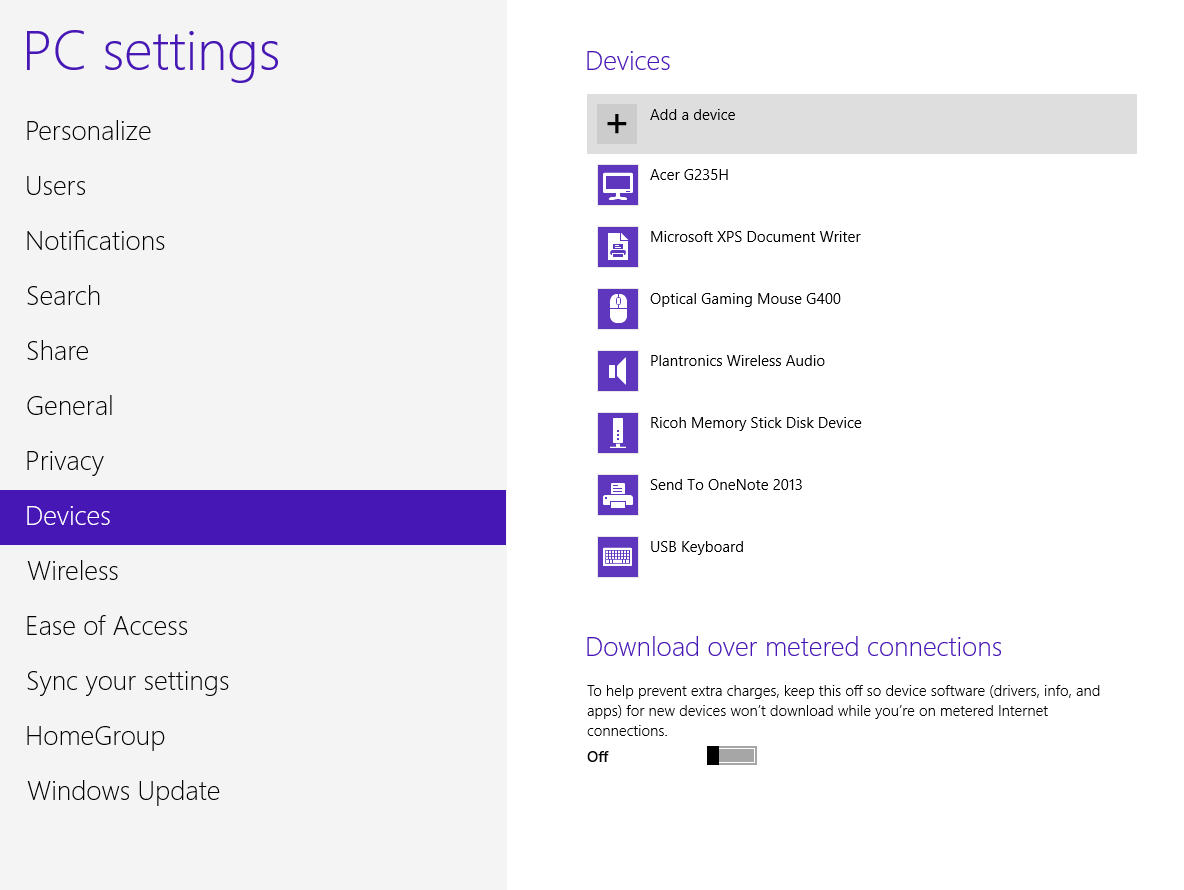
  5. คลิกอุปกรณ์ Devices
  6. คลิก Add a Device

  7. Turn On and Off Bluetooth in Windows 8
    Click Add a Device to begin the pairing process.