Acer Aspire 5350 Broadcom Bluetooth Driver 6.3.0.7300 for Windows 7 64-bit

Acer Aspire 5350 Broadcom Bluetooth Driver 6.3.0.7300 for Windows 7 64-bit คือชุดโปรแกรม Driver การ์ดบลูธูท สำหรับการรับส่งข้อมูลระยะใกล้ ของคอมพิวเตอร์ โน้ตบุ้ก Acer Aspire 5350 สำหรับผู้ที่มองหา Driver เพื่อติดตั้งใช้งาน ให้วินโดว์รู้จักอุปกรณ์ของเรา และสามารถใช้งานได้
ปกติบางรุ่นจะมีแผ่น Driver แถมมาด้วย แต่บางรุ่นก็ไม่มี แต่ให้เราสามารถค้นหาและดาวโหลดได้จากอินเตอรเน็ต
สเปกย่อ
ขนาดไฟล์ 59 MB.
ปล่อยตัว 22 ม.ค.2558
พัฒนาโดย Broadcom

รองรับ Windows 7 64 bit
บลูธูท รองรับ การรัยสังไฟล์ข้อมูลระหว่างอุปกรณื ในระยะไม่ไกล หรือใช้กับ อุปกรณ์ Hand Free ในการสื่อสาร หรือสนทนา ทางโทรศัพท์ เป็นต้น 

ดาวโหลด Acer Aspire 5350 Broadcom Bluetooth Driver 6.3.0.7300 for Windows 7 64-bit


This package contains the files needed for installing the Broadcom Bluetooth driver for Acer Aspire 5350 notebook. If it has been installed, updating (overwrite-installing) may fix problems, add new functions, or expand existing ones. Even though other OSes might be compatible as well, we do not recommend applying this release on platforms other than the ones specified.

Acer Aspire 5350 Realtek Audio Driver 6.0.1.6339 for Windows 7 64-bit

Acer Aspire 5350 Realtek Audio Driver 6.0.1.6339 for Windows 7 64-bit  คือชุดโปรแกรม Driver การ์ดเสียงของคอมพิวเตอร์ โน้ตบุ้ก Acer Aspire 5350 สำหรับผู้ที่มองหา Driver เพื่อติดตั้งใช้งาน ให้วินโดว์รู้จักอุปกรณ์ของเรา และสามารถใช้งานเสียงได้
ปกติบางรุ่นจะมีแผ่น Driver แถมมาด้วย แต่บางรุ่นก็ไม่มี แต่ให้เราสามารถค้นหาและดาวโหลดได้จากอินเตอรเน็ต
สเปกย่อ
ขนาดไฟล์ 146 MB.
ปล่อยตัว 22 ม.ค.2558
พัฒนาโดย Realtek

รองรับ Windows 7 64 bit

This package contains the files needed for installing the Realtek Audio driver for Acer Aspire 5350 notebook. If it has been installed, updating (overwrite-installing) may fix problems, add new functions, or expand existing ones. Even though other OSes might be compatible as well, we do not recommend applying this release on platforms other than the ones specified.

โหลด Acer Aspire 5350 Realtek Audio Driver 6.0.1.6339 for Windows 7 64-bit

วิธีรีเซต iPad air2

เครื่อง iPad Air 2 เวลาใช้งานไปตามปกติ จะมีการเชื่อมต่ออินเตอร์เน็ต การเข้าไปค้นหา และดาวโหลดแอพ ต่างๆ ใน App Store , การเปิดปิดแอพพลิเคชั่น ,การเล่นเกมส์ หรือความบันเทิงต่างๆ เป็นต้น

บางครั้ง iPad Air 2 อาจจะค้าง หรือ แฮงค์ หรือ หยุดการทำงานไปเลยก็ได้


ถ้าหากว่าใครมีปัญหาดังกล่าว ก็ไม่ต้องตกใจครับ เราสามารถแก้ไขปัญหาด้วยตนเองง่ายๆ ตามขั้นตอนดังต่อไปนี้ครับ


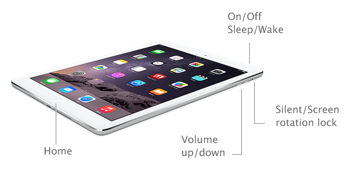
ลองรีสตาร์ทเครื่อง โดยการกดปุ่ม หลับ/ตื่น (ปุ่มเล็กๆ บนด้านขวาของเครื่อง) ภาษาอังกฤษคือปุ่ม sleep/wake กดค้างไว้ จนกระทั่ง แถบสไลด์สีแดงจะปรากฏขึ้นมา ให้เราเลื่อนแถบสไลด์ไปครั้งหนึ่ง จากนั้นให้ กดปุ่ม Sleep/Wake ค้างไว้ จนกระทั่งโลโก้ของ apple แสดงขึ้นมา

ถ้ากรณีแรกไม่ได้ผล ก็ให้ลองแบบต่อไปคือ


ลองรีเซตเครื่อง iPad air 2 โดยการกดปุ่ม Home และปุ่ม Sleep/Wake ค้างไว้พร้อมกัน รอสักครู่จนกระทั่ง โลโก้ของ apple แสดงขึ้นมา


อีกปัญหาหนึ่งอาจจะเกิดจากแบตเตอร์รี่เสื่อมสภาพ สำหรับเครื่องที่เก่าหลายปีแล้ว ให้ทดลองต่อสายซารต์แบตฯ ดู อาจจะใช้เวลานานกว่า 30 นาที ในการรอแบตฯ ให้มีกำลังไฟพอในการเปิดเครื่องใช้งาน

ถ้าทั้ง 3 แบบ ที่กล่าวมายังไม่ได้ผลสำหรับคุณ ก็ลองอีกวิธี ให้ใช้สายต่อ iPad Air2 เข้ากับเครื่องคอมพิวเตอร์ และลองเปิดโปรแกรม iTunes จากนั้นให้คลิกปุ่ม การคืนค่า หรือ Restore

แนวทางสุดท้าย ถ้าลองทั้ง ทุกแนวทางด้านบนแล้ว ยังไม่สามารถแก้ไขปัญหาได้ ก็อาจจะต้องเอาเครื่อง ไปที่ศูนย์บริการของ iPad ในพื้นที่ใกล้บ้านของคุณต่อไป


When iPad Air 2 is Frozen or unresponsive  what we can do to fix this issue.

In fact, there are various reasons for this issue ,however from my experience I have been found that an interruption from either applications script or ads ware is a key factor.   

If such this problems happen  do not panic. We can fix the problem easily. Follow the easy steps below it.

Try to restart the machine by pressing the sleep / wake  until the red slider appears. slide the  slider and then press the Sleep / Wake button until the apple logo appears.

If the issue is not fix try the next ways.

Try to reset the iPad air 2 by pressing the Home button and the Sleep / Wake button simultaneously. Wait until the apple logo appears.


Another common problem may be due to battery drain. . Try to recharge the battery may take longer than 30 minutes  to have enough power to run the machine.

If all 3 ways above does not fix the issue. Connect  iPad Air 2 with computer. And open iTunes, then click the Restore.


Finally, if all do not work for you may be take the machine to apple distributor shop near your house  is a must do.


การตัดสินใจเลือกซื้อ ipad air2

เมื่อท่านตกลงใจ หรือตัดสินใจแล้วที่จะซื้อหาแท็บเล็ต ipad air2 มาใช้งานเองสักเครื่อง หรือให้เป็นของขวัญสำหรับบุตรหลานของคุณ คุณสามารถ พิจารณา เลือกชื้อ ได้ 2 แนวทางคือ

1 การเลือกซื้อจากร้านหรือตัวแทนจำหน่ายสินค้าของ Apple โดยตรง เช่น ร้าน Power Buy ,ร้าน AIS Shop ,True Shop , DTAC  เป็นต้น ซึ่งร้านเหล่านี้ ส่วนใหญ่ก็จะมีตามห้างสรรพสินค้า ชั้นนำทั่วไป Big C,Tessco Lotus , เป็นต้น

ข้อดีของการ ซื้อจากร้านค้าหรือผู้แทนจำหน่าย เหล่านี้คือ ได้เห็นสินค้า ได้ทดลองสินค้า และได้รับสินค้าได้ทันที่ ส่วนการชำระเงินก็เลือกจ่ายได้ทั้งแบบเงินสด หรือผ่อนชำระ  ซึ่งจากการที่ผมได้ไปสำรวจตลาดและราคาจะพบว่า จะมีราคาเท่ากับร้าน Apple Store แต่อาจจะมีโปรโมชั่นพิเศษ เช่ม แถม ฟิมล์กันรอยนิ้วมือ หรือ เคสป้องกันการตกหรือกระแทก ก็ต้องลองสอบถามหรือพูดคุยกับพนักงานขายหรือตัวแทนจำหน่ายของแต่ละแห่งดูกันเอาเองครับ


2 การสั่งซื้อสินค้าออนไลน์จาก เว็บไซต์ของ apple store http://store.apple.com/th/buy-ipad/ipad-air-2
ข้อดีของการสั่งสินค้าออนไลน์ คือ เราไม่ต้องเสียเวลาขับรถไปดูสินค้าเองที่ร้านหรือตัวแทนจำหน่วยให้เสียเวลา และในขั้นตอนการสั่งซื้อ จะมีบริการ สลักข้อความฟรี บริเวณ ด้านหลังของตัวเครื่อง เช่น อาจจะสลักชื่อเล่น หรือชื่อจริง เบอร์ติดต่อ เป็นต้น  จากนั้น ชำระเงินด้วยบัตรเครดิต และคอยรับตัวเครื่องที่จะมาส่งให้คุณถึงบ้าน ได้เลย

ข้อเสีย ของการสั่งสินค้าออนไลน์ ก็คือ คุณไม่ได้รับของทันที และไม่ได้ลองเล่นหรือทดสอบสินค้าก่อน และอีกอย่างคือ สินค้าที่สั่งซื้อจะส่งจากโรงงานผลิตจากต่างประเทศ ซึ่งจะต้องใช้เวลา ในการเดินทางประมาณ 3-5 วันโดยประมาณ (ค่าจัดส่งฟรี) และถ้ามีการเลือก สลักข้อความฟรีด้วย ก็จะทำให้การส่งสินค้าล่าช้าได้นิดหน่อย แต่ถ้าใครที่ต้องการจะสลักข้อความด้านหลังฟรี และคิดว่ารอช้านิดหน่อยได้ 3-5 วัน ก็ถือว่า OK ครับ

ข้อพิจารณาประกอบการตกลงใจ

มีหลายข้อถ้าจะคิดมาก แต่ถ้าไม่ได้มีความรู้ด้านคอมพิวเตอร์ และเทคโนโลยี สารสนเทศ มากนัก ก็สามารถพิจารณา ปัจจัยประกอบหลักๆ ในการเลือกซื้อ Apple ipad air2 คือ


เลือกสี Apple ipad air2 มี 3 สีให้เลือก ตามต้องการ คือ

1 สีเงิน
2 สีทอง
3 สีเทาสเปซเกรย์

เลือก ความจุหรือ คนไทยเรานิยมเรียกกันติดปาก ว่า จิ้ก ย่อมาจาก Gigabyte เป็นหน่วยนับขนาดความจุของข้อมูล HDD หรือ Card Memory ของเครื่อง Apple ipad air2


ขนาดความจุหรือ จิ้ก ของ Apple ipad air2  มีให้เลือก 3 ขนาดคือ
1 ขนาดความจุเริ่มต้นที่ 16 GB. ราคา 16,900.- บาท
2 ขนาดความจุเริ่มต้นที่ 64 GB. ราคา 20,400.- บาท
3 ขนาดความจุเริ่มต้นที่ 128 GB. ราคา 23,900.- บาท

ข้อพิจารณา ง่ายๆ คือ จิ้กน้อย ราคาถูกและประหยัด แต่หลังจากใช้งานไปแล้ว จะมีการดาวโหลด แอพเพิ่มเติม หรือการถ่ายภาพ +วิดีโอ พื้นที่ใช้งานก็อาจจะเต็มเร็ว แก้ไขโดย การลบออกหรือ ถ่านโอนภาพ +วิดีโอ ออกไปเก็บยังแหล่งอื่นๆ

ถ้าจิ้กมาก ราคาก็จะแพงขึ้นไป ตามลำดับ แต่ก็จะได้พื้นที่ในการเก็บข้อมูลที่มากขึ้น จะโหลดแอพ หรือจะถ่ายภาพ + วิดีโอ ก็เก็บบันทึกได้มากกว่า สะดวกมากกว่า นั้นเอง

สรุปว่า จะเลือกความจุขนาดไหนๆ ก็คงดูที่ ความต้องการใช้งานของตนเอง เป็นหลัก และ พิจารณางบประมาณ ในกระเป๋าของเรา ตามมาว่าจะสะดวกจ่ายในราคาใด

เลือกการเชื่อมต่อ Connectivity 

จะมี 2 แบบ คือ
แบบ Wi-Fi
แบบ Wi-Fi + Cellular

ข้อพิจารณา
แบบ Wifi+Cellular ราคาจะอัพเพิ่มขึ้นจากแบบ Wifi อย่างเดียว อีกประมาณ 4,500 บาท เพราะสามารถใส่ SIM ของโทรศัพท์ เช่น TRUE,AIS,DTAC เข้าไปได้ ทำให้สามารถใช้งานโทรศัพท์ได้ และใช้งานแพกเกจ Internet พวก บริการ 3G,4G ของค่ายต่างๆ  ทำให้เลือกเข้าถึงเครือข่ายอินเตอร์เน็ตได้ในขณะเดินทาง ตามสนามบิน สถานีรถไฟ หรือบนรถยนต์ จึงเหมาะสำหรับคนใช้งานที่ต้องเดินทางประจำ

ส่วนการเชื่อมต่อแบบ Wifi ธรรมดา เหมาะสำหรับคนที่มีบริการฟรีเครือข่ายอินเตอร์เน็ตที่บ้านหรือสำนักงานอยู่แล้ว และไม่ค่อยได้เดินทางออกนอกสถานที่ประจำมากนัก

ก็คงมี 3 ส่วนหลักๆ ในการพิจารณา ส่วนได้ตัวเครื่องมาแล้ว เราจะดูแลักษา หรือจะมีวิธีการใช้งานอย่างไรให้เต็มประสิทธิภาพ และคุ้มค่ามากที่สุด อย่าลืมติดตามบทความและเนื้อหาจาก Blog  ในตอนต่อๆ ไป ครับ

How to buy Apple ipad air2 in Thailand.

Before making a decision to buy Apple iPad air2 in Thailand.
Purchasing an Apple ipad air2 for yourself or given as a gift for kids or families. Before making a decision to buy there are 2 options to buy Apple ipad air2 in Thailand.
Option 1: Buying  from an Apple distributor shop in Thailand such as Power buy,AIS Shop,Dtac Shop, and True  H Shop for instance. Most of them are located in the mall and IT department center like in Big C, Tessco lotus,etc.

There are advantages for buying from distributor shop.

1 A demo products available for customers to test.
2 Same price as order from Apple store.
3 Instantly receive the product.
4 May receive some gift vouchers or sale promotions.

Option 2 : Online ordering  from apple store website  http://store.apple.com/us/buy-ipad/ipad-air-2 

There are advantages for Online ordering  from apple store website.
1 Easy to order and free shipping
2 Free Personalize your iPad with free engraving,however please note: Engraved products may have extended delivery dates.

There are some disadvantages when  making  Online ordering  from apple store website.
1 No chance to see, touch and run the ipad air2 demo test when compare with buying from the distributor shop.
2 Can not receive the product instantly,but have to wait. Normally it will be shipped from oversea manufacturing which may take  about 3-5 days.

What color to choose?

There are 3 colors available for customer to choose.
Silver
Gold
Space Gray

How much a storage to choose?

Apple ipad air2 available in 3 storage sizes as below.
16 GB. /499$
64 GB. /599$
128 GB. /699$

Things to consider about the storage size.
iPad Air 2 come along with many interesting capabilities such as internet surfing, email checking ,watching movie ,taking a  photo&video ,writing the reports,and reading ebook. Moreover ,there is a hundred thousand applications  available on App store to download and install.
well,the key points is.
If budget is not a problem ,then focusing on the main purpose of using iPad Air 2 is very important.
Only surfing internet ,reading ebook and taking some photo or short video then 16 Gb. is considered enough , but ,if you plan to download and install more applications or love to take a lot of photo and video then 64 Gb. or 128 Gb. is a choice.

Choose the connectivity 

Wi-Fi or Wi-Fi + Cellular?What the different?
For Wi-Fi : iPad connect with wireless hotspots at home or offices ,The price is 145$ cheaper than the model of Wi-Fi+Cellular,ideally for a person who is not travelling ,but working at home or office.

Wi-Fi + Cellular: iPad connect  Internet using a fast cellular connection when Wi-Fi isn’t available. So you can stay connected on the train, at the park, or on a road trip. You can buy an iPad with Wi-Fi + Cellular model without a contract and purchase cellular service separately. In Thailand there are some carriers like TRUE MOVE,AIS,DTAC.


That are some factor to consider when one want to order the apple iPad Air 2 from the Apple store website or from the apple's distributor shop. For more content about how to take care ,apps download and install ,including tips and tricks please feel free to keep me post and I will update some more in the future.




เกี่ยวกับ ipadairkm

บล็อกนี้ถูกสร้างขึ้นมา โดยมีวัตถุประสงค์ เพื่อเผยแพร่และแบ่งปัน ความรู้และประสบการณ์ในการใช้งาน Apple ipad Air2 ให้กับผู้ใช้งาน Apple ipad Air2   และผู้ที่ที่มีความสนใจโดยทั่วไป ทั้งชาวไทยและชาวต่างประเทศ ในรูปแบบของการบริหารและจัดการองค์ความรู้หรือ KM (Knowledge Management)  เพื่อให้สามารถใช้งาน Apple ipad Air2 ได้อย่างถูกต้องและเต็มประสิทธิภาพและความสามารถของตัวเครื่องให้มากที่สุด ตั้งแต่ คุณลักษณะทางเทคนิค ปัจจัยประกอบการตกลงใจเลือกซื้อ Apple ipad Air2 การเริ่มต้นใช้งาน ตลอดจนขั้นตอน แนวทาง การใช้งาน การแก้ไขปัญหา ทิปและเทคนิคการประยุกต์ใช้งาน

สำหรับเนื้อหาของบล็อก จะอาศัยการถ่ายทอดความรู้และประสบการณ์การใช้งานจริง Apple ipad Air2 ประกอบกับการศึกษา ค้นคว้าข้อมูลเพิ่มเติมจากอินเตอร์เน็ตในบางประเด็นที่น่าสนใจ
หากจะมีคำแนะนำหรือติชม สามารถฝากข้อมูลหรือ Comment ภายใต้บล็อก Post ได้ครับ

About blog ipadairkm.blogspot.com is main focus on the Apple ipad air knowledge management (KM) ; ipad air basic using ,a guide and how to operate ,tops and tricks to use ipads air for everyonw who looking for such information.
The main contents will be written from the directly working with  ipad air as well as research some form the internet as well.

For more detail or any questions feel free to leave me a comment.

ดาวโหลด Desktop Plagiarism Checker

แนะนำฟรีแวร์ เพื่อการศึกษาที่น่าสนใจ สำหรับน้องๆ นักเรียน นักศึกษา ครู อาจารย์ หรือ ผู้สนใจทั่วไป ที่ถนัด หรือสนใจงานเขียน บทความทางภาษาอังกฤษ การเขียนเรียงความ หรือบทบรรยายต่างๆ เป็นภาษาอังกฤษ
แน่นอนว่า หากเราไม่ได้เป็นเจ้าของภาษา การที่จะมั่นใจได้ว่า การเขียนของเราถูกต้องตามหลักภาษาหรือไม่ มีคำผิดหรือ ตกบกพร่องไปหรือเปล่า
ดังนั้นการคัดลอกหรือการตัดแปะ กำลังเป็นที่นิยมและระบาดอย่างมาก ในวงการศึกษาปัจจุบัน ซึ่งการเขียนที่ดี เราควรจะเขียนด้วยตัวเอง หรือ รวบรวมมาเขียนด้วยตนเอง ส่วนการคัดลอกเนื้อหาของคนอื่นๆ ในรูปแบบของการ Copy และวาง Paste นั้น ไม่สมควรทำอย่างยิ่ง

การตรวจสอบว่า เนื้อหาบทความซ้ำซ้อนหรือคัดลอกงานจากอินเตอร์เน็ตมาส่งหรือไม่ สามารถ ทำได้ผ่านโปรแกรม ตรวจสอบทางอินเตอร์เน็ต หรือจะผ่านโปรแกรมช่วยอย่าง Desktop Plagiarism Checker
ก็เป็นทางเลือก ที่น่าสนใจ
โดยดาวโหลดและติดตั้งใช้งานกับคอมพิวเตอร์ของเรา โดยไม่ต้องมีการเชื่อมต่ออินเตอร์เน็ต ก็สามารถใช้งานได้

สเปกย่อ
Version:
1.11
Total Downloads:
113,714
Date Added:
Dec. 18, 2012
Price:
Free
File Size:
4.21MB
Downloads Last Week:
1,021
Platform:
Windows
ดาวโหลด Desktop Plagiarism Checker


Free online plagiarism checker. Duplicate content check. Plagarism detector. Plagerism software. Turnitin free alternative. Check for plagiarism in articles, patents, books, essays, term papers, legal opinions and journals. Check your txt, html, rtf, doc, odt, docx, pdf files


Today it is very easy to look for some interesting contents on internet in order to make a copy and paste with out given the correct references.
If you are a teacher or professor who would like to know that the essay or the thesis in which was assigned to your students and when they come to submit to you is a new content from study and research or just the duplicate content from internet,then using this free tool to help you to check for the     “Cyber-Plagiarism

ดาวโหลด StartW8

StartW8 เป็นฟรีโปรแกรมดาวโหลด สำหรับการทำให้วินโดว์ 8 ของผู้ใช้งาน มีเมนูเริ่มต้นการใช้งาน แบบเป็นเมนู ที่คุ้นเคย คล้ายๆ กับ วินโดว์ 7 ที่ผ่านมานั้นเอง

อย่างที่ทราบกันว่า ใน W8 ทางผู้พัฒนา ได้ตัดตัวเลือกในการเข้าถึงโปรแกรม ใช้งานแบบ เมนู เดิม ออกไป

ดังนั้นใครที่ใช้ W8 ที่สนใจ และต้องการจะใส่เมนูใช้งาน แบบเดิมเข้าไปให้ Windows 8 ก็สามารถดาวโหลด ไปติดตั้งและใช้งานกันได้ครับ

StartW8 is a free but powerful tool for Windows 8, 8.1 and Windows Server 2012 users. Do you prefer desktop to modernUI? Would you like to logon directly to desktop? And than use Start menu for runnig your apps? Then it's right for you. Start menu had been an essential feature of Microsoft Windows for almost two decades, used by countless users all over the world. But Windows 8 and Windows Server 2012 are shipped without it. Just like you, we refused to accept this situation, which is why we decided to make Start menu of our own. We put it back to Windows and we even added a few new features. We called it StartW8 and now you can use it too. It's free, quick, easy.

What's new in this version:
New Right Menu items.
StartW8 Start Menu new translation included (Romanian).

สเปกโดยย่อ

  • Version:
    1.2.111.0
  • Price:
    Free
  • File Size:
    708.79KB
  • Downloads Last Week:
    2,150
  • Platform:
    Windows
 ดาวโหลด StartW8